Cara Proteksi Workbook Pada Ms.Office Excel

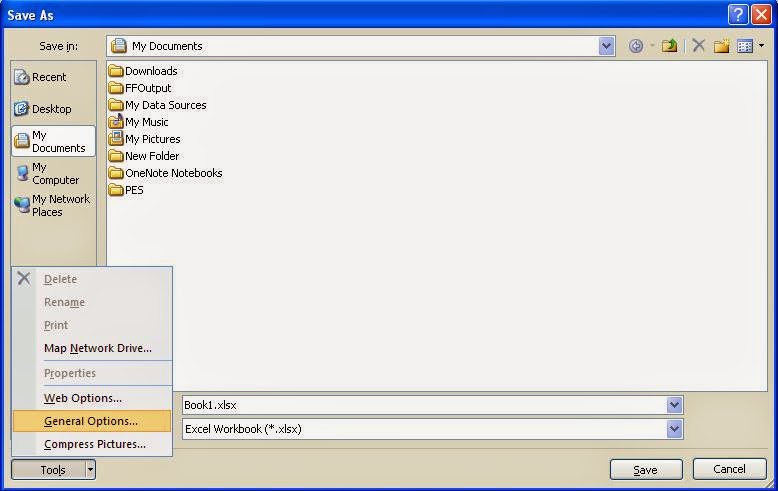
  • Buka lembar kerja Ms.Office Excel yang ingin diproteksi
  • Simpan seperti biasa Ctrl + S
  • Klik Tools
    Cara Proteksi Workbook Pada Ms.Office Excel
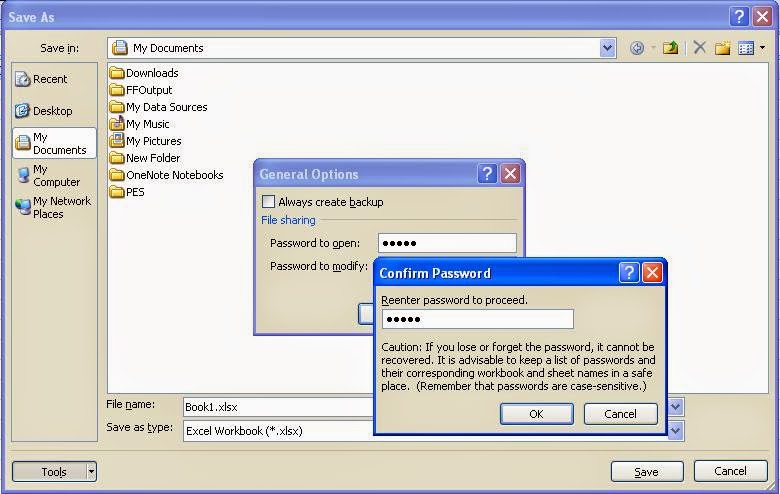
  • Maka akan tampil jendela General Options
    Cara Proteksi Workbook Pada Ms.Office Excel
  • Pada Password to open isikan pasword yang diinginkan dan untuk membuka nantinya
  • Klik OK
  • Maka akan tampil jendela Confirm Password
  • Isikan kembali password yang sudah dibuat tadi
  • Klik OK

إرسال تعليق

Cookie Consent
We serve cookies on this site to analyze traffic, remember your preferences, and optimize your experience.
Oops!
It seems there is something wrong with your internet connection. Please connect to the internet and start browsing again.
Site is Blocked
Sorry! This site is not available in your country.