Cara Menggabungkan Cell Baris dan Colom Pada Ms.Excel 2007

  • Pertama, buka lembar kerja Ms.Office Excel
  • Blog cell yang ingin digabungkan
  • Klik menu Home pada Menu Bar
  • Klik icon Merge and Center pada group Aligenment
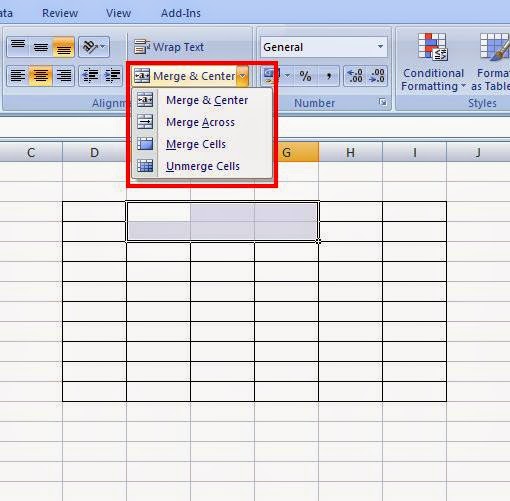
    Cara Menggabungkan Cell Baris dan Colom Pada Ms.Office Excel
  • Maka secara otomatis cell akan tergabung.
Merge & Center : Menggabungkan yang menjadikan posisi teks di tengah
Merge & Across : Menggabungkan cell dalam baris
Merge Cells : Menggabungkan semua cell dengan teks rata kiri
Unmerge Cells : Membatalkan penggabungkan cell

Posting Komentar

Cookie Consent
We serve cookies on this site to analyze traffic, remember your preferences, and optimize your experience.
Oops!
It seems there is something wrong with your internet connection. Please connect to the internet and start browsing again.
Site is Blocked
Sorry! This site is not available in your country.